Hyprr: Trade Hyperliquid From Your Phone, Keys Included
- tags
- #Android #Kotlin #Kmp #Cryptocurrency #Development
- published
- reading time
- 6 minutes
Hyperliquid is an on-chain exchange for perpetuals and spot that feels like a centralised one: an order book, sub-second fills and a public API for everything. Its website works on a phone if you’re patient, but I wanted a real app in my pocket. So in March I started Hyprr, a native client for it. It’s been on Google Play since the end of June, and version 1.1.1 went out today.
Your keys stay in your wallet
A trading app that asks for your seed phrase is a trading app you shouldn’t use. Hyprr never asks for it. You add a wallet in one of two ways:
- View Only: paste any address and Hyprr shows its positions, orders and history. Nothing to sign.
- Connect for Trading: link MetaMask, Rabby, Rainbow, Trust or any other EVM wallet over WalletConnect.
When you connect, Hyprr creates an API wallet (Hyperliquid calls it an agent) on the device, and your main wallet approves it once. From then on every order is signed on the phone with EIP-712, and your main wallet’s key never leaves your wallet app. The agent can trade but can’t withdraw, and you can revoke it on Hyperliquid at any time.
The agent key lives in an encrypted database: SQLCipher on Android, with the passphrase in the hardware-backed Keystore, and file protection on iOS. It’s excluded from cloud backup, connections to Hyperliquid are TLS-pinned, and Android blocks screenshots of the app so balances don’t end up in the app switcher. There’s an optional biometric lock and a Hide PnL switch for when someone is looking over your shoulder.
What’s inside
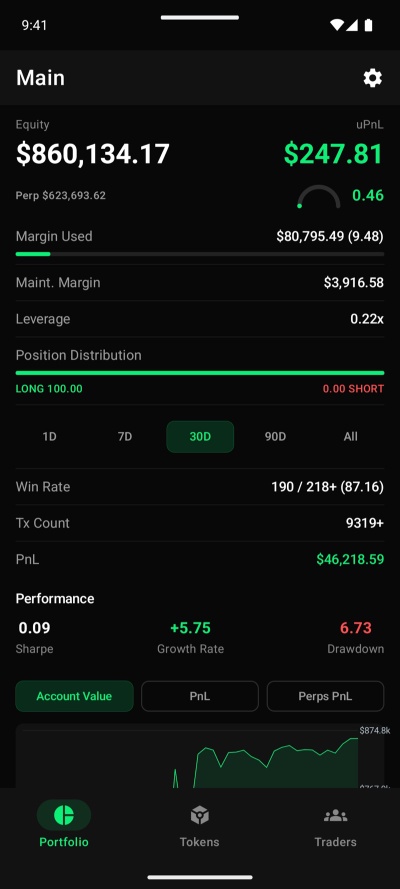
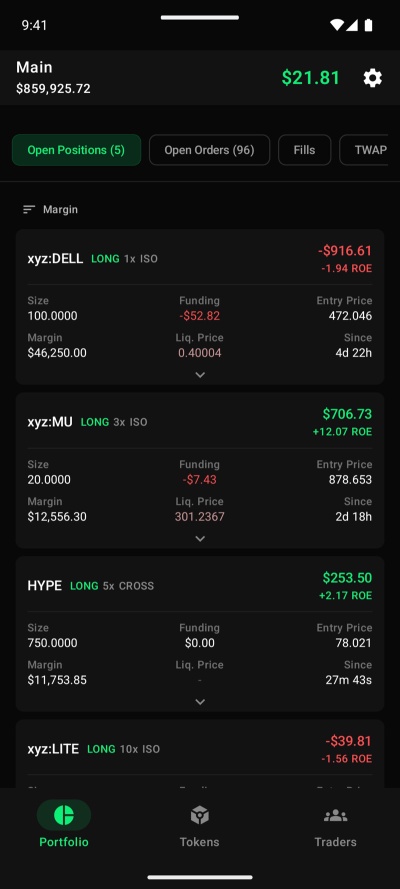
Portfolio puts all your wallets in one view: equity, unrealised PnL, margin, leverage, win rate, Sharpe ratio and drawdown, with Account Value, PnL and Perps PnL charts. Each wallet has its open positions, open orders, fills, TWAPs, completed trades and funding history, and every row opens that coin’s chart.
Tokens lists every Hyperliquid market: perps, spot and HIP-3, the builder-deployed markets for stocks, indices and commodities. Filter by Crypto, TradFi, HIP-3, Trending or Pre-launch, search, and star your favourites.
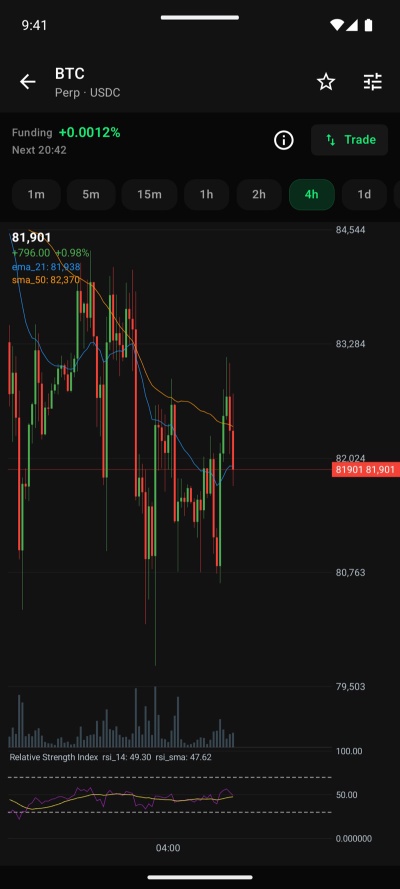
Trading covers market, limit, scale and TWAP orders, cross or isolated leverage, reduce-only, and take-profit / stop-loss on entry or per position. Close, reverse or close everything from one sheet. The chart has candles from 1 minute to 1 week with moving averages, RSI, MACD, ADX, ATR, Stochastic and more, saved as your own setups, and your own buys and sells drawn on it.
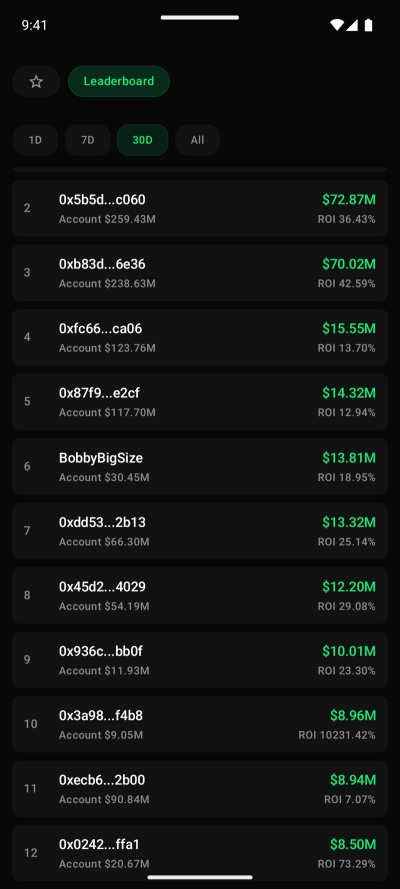
Traders arrived in 1.1.0. Hyperliquid removed its Outcomes markets, so the tab that showed them became Hyperliquid’s leaderboard: 1D, 7D, 30D and All time, ranked by PnL, with ROI and volume. Open any wallet read-only, and star it to follow it under Favorites with live equity, PnL and positions.
On tablets and in landscape the screens sit side by side: the chart next to the order ticket, your portfolio next to the wallet, and the full leaderboard as a sortable table. The app is in English, Spanish, French, Korean and Simplified Chinese.
Live, over one WebSocket
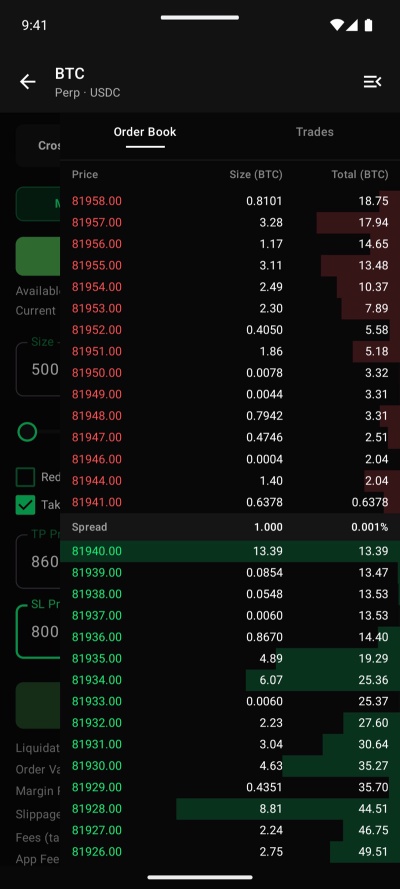
The order book, trades, candles, prices, funding and your open orders all stream over Hyperliquid’s WebSocket, and REST only fills in what the socket doesn’t send. That works well until the exchange changes underneath you. Hyperliquid retired webData2, the one channel that carried a whole account, so Hyprr now subscribes to openOrders and twapStates once per perp dex (every HIP-3 deployer is its own dex) plus spotState.
Hyperliquid’s API has a few more surprises:
- The leaderboard is one file. No paging, no top-N, no compression: about 40 MB of JSON with 47,000 traders. The app streams it straight from the network buffer into objects, without building a 40 MB string first, keeps it for an hour, and ranks and searches it in memory.
- Fills stop at 2,000.
userFillsonly returns the latest 2,000, and a cappeduserFillsByTimepage holds the oldest fills of its range. Walking forwards leaves a gap right where your recent stats are, so Hyprr walks backwards, and marks stats that reach past the gap-free range with a “+”. - Decimal commas. A Spanish, French or German keyboard types
0,5, and a numeric field that drops the comma reads05. On a money field that’s a 10× order. That one turned up in a review pass before the first release, and every numeric field now normalises the comma first.
How it’s built
It’s Kotlin Multiplatform with Compose Multiplatform, one codebase for Android and iOS, and the modular layout I later reused for Gas On Route:
:domainholds the models, the data source interfaces and the use cases, including the trade stats and round-trip maths.:core:remote(Ktor, REST and WebSocket) and:core:local(SQLDelight) sit behind those interfaces, so the features never touch them directly.:feature:portfolioand:feature:tradeare the screens, with Voyager for navigation and Koin for DI.- EIP-712 signing is pure Kotlin (secp256k1-kmp and Keccak), so it runs the same on both platforms. WalletConnect is the exception: Reown’s Kotlin SDK on Android, and its Swift SDK on iOS, plugged into Koin from the Swift side.
Crash reports go to my self-hosted GlitchTip, with wallet addresses removed on the device first. That’s the only data that reaches a server of mine: no accounts, no ads, no analytics. Release builds upload their R8 mapping so stack traces come back readable. Today’s 1.1.1 came out of that, too: R8 had renamed Hyprr’s own exception classes, so a WalletConnect timeout showed “Something went wrong” instead of telling you what to do.
The landing page, hyprr.cat, is a small Hugo site in the same repo, published by a Gogs hook on every push, like this blog.
Built with Claude Code
Like Gas On Route, Hyprr was built in close collaboration with Claude Code. I set the direction and made the product and risk calls; it did much of the typing, the digging through Hyperliquid’s API docs, the tests (160 and counting) and the checking on emulators and simulators. For an app that signs orders with real money behind them, the review passes mattered as much as the code.
Try it
Hyprr is free to download, with no sign-up, on Google Play. Watching wallets, the leaderboard and charts is free. Orders placed through Hyprr carry a 0.1% builder fee on top of Hyperliquid’s own fees; you approve it once when you connect, and every order ticket shows it. iOS is on its way. More at hyprr.cat.
Hyprr is an independent app, not affiliated with Hyperliquid Labs. Trading perpetual futures carries a high risk of loss.