When AI Crawlers Attack: A Server Performance Horror Story
- tags
- #Devops #Performance #Ai #Gogs #Nginx #Troubleshooting
- published
- reading time
- 9 minutes
How ClaudeBot brought my Gogs server to its knees and taught me about the hidden costs of the AI gold rush
Updated October 2026: this didn’t end with one
if. See Update #1 and Update #2 at the end.
The Problem: Server on Fire
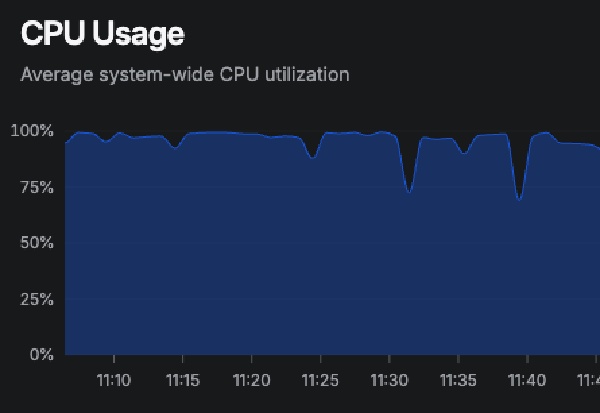
It started like any other morning. My monitoring system, Bezel, was screaming at me: 98% CPU usage on my modest server which wasn’t build for such thing. The server was practically on fire.
A quick top command revealed the culprit: my Gogs git repository service was consuming around 20% CPU constantly. For a service that usually idles at 2-3%, this was alarming. I’d recently migrated from repo.codeskraps.com to git.codeskraps.com, so my first instinct was to blame the domain change.
First Lead: The Domain Migration Red Herring
The initial investigation seemed promising. The systemd logs showed Gogs had consumed an astronomical 1 day, 10 hours, and 57 minutes of CPU time before my reboot. The application logs still showed references to the old domain:
Available on http://repo.codeskraps.com/
Classic configuration mismatch! I updated the app.ini file:
[server]
DOMAIN           = git.codeskraps.com
EXTERNAL_URL     = http://git.codeskraps.com/
The CPU usage calmed down immediately. Problem solved, right? Wrong.
The Real Culprit Emerges
An hour later, the CPU spiked again. Time to dig deeper.
The database logs revealed a disturbing pattern - constant failed authentication attempts:
record not found
SELECT ... FROM `user` WHERE user.email = "some@email.com" ...
record not found
SELECT ... FROM `user` WHERE user.email = "some_other@email.com" ...
Every few seconds, someone was trying to authenticate with non-existent user accounts. But who? The strace output showed child processes being spawned and terminated rapidly, with heavy database lock contention.
Down the Authentication Rabbit Hole
I suspected compromised credentials or a misconfigured CI/CD system. The email addresses looked like internal corporate accounts - maybe some automated system was trying to access repositories with old credentials?
I spent valuable time investigating:
- Webhook configurations
- Failed delivery queues
- Repository corruption
- Database integrity
- Git process loops
All clean. The mystery deepened.
The Smoking Gun: Web Server Logs
Finally, I checked what I should have looked at first - the nginx access logs:
sudo tail -f /var/log/nginx/access.log | grep git.codeskraps.com
The output was shocking:
216.73.216.179 "GET /codeskraps/ManualTrader/src/..." "ClaudeBot/1.0"
216.73.216.179 "GET /codeskraps/Blog/commits/..." "ClaudeBot/1.0"
216.73.216.179 "GET /codeskraps/sBrowser/commit/..." "ClaudeBot/1.0"
ClaudeBot was absolutely hammering my server. Request after request, hitting every file, every commit, every branch, with different language parameters (?lang=es-ES, ?lang=pt-PT, etc.). Hundreds of requests per minute from Anthropic’s web crawler.
The AI Crawler Problem
Each ClaudeBot request forced Gogs to:
- Process the HTTP request
- Attempt user authentication (explaining the database queries)
- Generate git file/commit views
- Parse and render repository content
- Return potentially large responses
With a relentless stream of requests, my poor single-core server was drowning. The “authentication failures” weren’t failed logins - they were Gogs trying to determine access permissions for each crawled page.
The Solution: Just Say No
The fix was surprisingly simple. I updated my nginx configuration to block ClaudeBot:
server {
    server_name git.codeskraps.com;

    # Block ClaudeBot to prevent CPU overload
    if ($http_user_agent ~* "ClaudeBot") {
        return 403;
    }

    location / {
        proxy_pass http://localhost:3000;
        # ... rest of config
    }
}
Immediate relief. The logs showed ClaudeBot getting 403 Forbidden responses instead of overwhelming my application server:
216.73.216.179 "GET /codeskraps/ManualTrader/..." 403 134 "ClaudeBot/1.0"
CPU usage dropped to normal levels within minutes.
The Broader Issue: AI’s Hidden Infrastructure Cost
This incident highlights a growing problem in the AI era: aggressive web crawling is becoming an infrastructure tax on small developers and businesses.
AI companies are in an arms race to collect training data. Their crawlers are becoming more aggressive, more comprehensive, and more resource-intensive. While large platforms like GitHub can handle the load, small self-hosted services get overwhelmed.
Consider the resources consumed:
- Bandwidth for serving pages that will never be seen by humans
- CPU cycles processing requests that provide no value to the site owner
- Database queries for permission checks on content that will be scraped regardless
- Server costs scaling with crawler activity, not actual usage
What You Can Do
If you’re running your own services, consider these protective measures:
1. Monitor Your Logs
Check your web server logs regularly for crawler patterns:
grep -i "bot\|crawler" /var/log/nginx/access.log | tail -20
2. Implement Selective Blocking
Block aggressive crawlers in your web server configuration:
if ($http_user_agent ~* "(ClaudeBot|GPTBot|ChatGPT-User|CCBot|anthropic|OpenAI)") {
    return 403;
}
3. Use robots.txt (Though Many Ignore It)
User-agent: ClaudeBot
Disallow: /

User-agent: GPTBot
Disallow: /

User-agent: ChatGPT-User
Disallow: /
4. Rate Limiting
Implement request rate limiting to prevent any single source from overwhelming your server.
The Irony
The most ironic part? I was using Claude (Anthropic’s AI) to debug the very problem that ClaudeBot (Anthropic’s crawler) was causing. It’s a perfect metaphor for the AI age - the same companies creating useful AI tools are also creating the infrastructure problems we need AI tools to solve.
Conclusion
This wasn’t a complex technical issue requiring deep system knowledge. It was a resource exhaustion problem caused by an overly aggressive web crawler. The time I spent investigating authentication systems, database corruption, and git processes was wasted because I didn’t start with the most basic question: “What’s actually hitting my server?”
The lesson? When facing performance issues, always check your access logs first. And in 2025, be prepared to defend your servers against the AI crawler invasion.
Your personal server wasn’t designed to feed the AI training pipeline. It’s okay to say no.
Want to protect your own services? Start with web server logs and don’t let the bots eat your lunch.
Update #1 (September 2026): From One Bot to a Block List
A year on, a single if for ClaudeBot looked naive. ClaudeBot is one crawler among many, and every one of them would do the same thing to Gogs: every commit, every file, every blame view, each one in several ?lang= variants. So I replaced the one-liner with a proper list.
Instead of stacking if blocks, nginx now uses a map on the user agent. It’s evaluated once per request, and adding a crawler is one line:
map $http_user_agent $block_ai_crawler {
    default                 0;
    "~*ClaudeBot"           1;
    "~*GPTBot"              1;
    "~*CCBot"               1;
    "~*Google-Extended"     1;
    "~*Bytespider"          1;
    "~*Amazonbot"           1;
    "~*PerplexityBot"       1;
    "~*Meta-ExternalAgent"  1;
    "~*Applebot-Extended"   1;
}

server {
    server_name git.codeskraps.com;

    location / {
        if ($block_ai_crawler) {
            return 403;
        }
        proxy_pass http://localhost:3000;
        # ...
    }
}
Two decisions mattered here:
- Only training crawlers are blocked. Fetches that a person triggers, like
Claude-UserorChatGPT-Userwhen someone asks an assistant to read a page, still get through. So do normal search engines like Googlebot and Bingbot. I’m not trying to hide the repos, I just don’t want to feed a training pipeline from a single-core box. (That’s also why theChatGPT-Userentry in my “What You Can Do” list above was a mistake.) - nginx serves
robots.txtitself. Polite crawlers check it first, and there’s no reason to make Gogs render it:
location = /robots.txt {
    default_type text/plain;
    return 200 "User-agent: ClaudeBot\nDisallow: /\n\nUser-agent: GPTBot\nDisallow: /\n...";
}
The 403 is for the ones that don’t read it.
Update #2 (October 2026): Claude-SearchBot
In October I went through the access logs again, and the top user agent by a mile was Claude-SearchBot, Anthropic’s search crawler. It isn’t ClaudeBot, so it wasn’t on the list.
The numbers from the nginx logs:
- About 7,000 requests an hour, around the clock, from a single IP
- Roughly 165,000 requests a day, and about 2.4 million over the two weeks of logs I keep
- Spread over Blog, ManualTrader, FreqDroid and Weekly-Weather: commit views, source trees, every
?lang=variant - Half of them were
302redirects, so Gogs answered most pages twice: once for the redirect, once for the page
The fix was three more lines in the map and three more entries in robots.txt: Claude-SearchBot, OAI-SearchBot (OpenAI’s equivalent) and SemrushBot (an SEO crawler that showed up in the same log scan).
A bug in my own block
While I was in there, I found a bug that had been in the config since the first version of this post. The match was ~*ClaudeBot, case-insensitive and anywhere in the string. The user agent for Claude-User, the fetch that happens when a person asks Claude to read a page, can contain a contact address:
... Claude-User/1.0; +claudebot@anthropic.com)
claudebot@ matches ClaudeBot when you ignore case. So I’d been blocking the exact traffic I meant to allow. The fix is to match the product token with its slash:
"~*ClaudeBot/"          1;   # with the slash: Claude-User can carry +claudebot@anthropic.com
"~*Claude-SearchBot"    1;
"~*OAI-SearchBot"       1;
"~*SemrushBot"          1;
Then I tested every user agent with curl before trusting it:
curl -s -o /dev/null -w '%{http_code}\n' \
  -A 'Mozilla/5.0 (compatible; Claude-SearchBot/1.0; +searchbot@anthropic.com)' \
  https://git.codeskraps.com/codeskraps/Blog
# 403
What happened next
This is the part I didn’t expect. Hour by hour, from the logs on the day of the change:
| Hour (UTC) | 200 | 302 | 403 |
|---|---|---|---|
| 10:00 | 3,562 | 3,397 | 0 |
| 11:00 (block at 11:32) | 1,949 | 1,846 | 1,613 |
| 12:00 | 1 | 0 | 113 |
| 13:00 onwards | 1 an hour (robots.txt) |
0 | 0 |
For about 30 minutes the crawler kept going and got 403s. Then it fetched robots.txt, saw the Disallow, and stopped completely. Since then it requests robots.txt once an hour and nothing else. That’s well-behaved, it just didn’t have a rule telling it to stay away until I wrote one.
And a fake one
The logs also showed “Claude-SearchBot” requests from a Google Cloud IP, probing for /.env, /serverless.yml and POST /. That isn’t Anthropic, it’s a vulnerability scanner wearing a crawler’s user agent. A reminder that the user agent is just a string anyone can send. The block list keeps the honest crawlers’ load down. It is not security.
Lessons, one year later
- New crawlers keep appearing. A block list needs checking now and then. I now run this every so often to see who’s crawling:
zcat -f /var/log/nginx/access.log* | awk -F'"' '{print $6}' \
  | grep -ioE '[a-z-]*bot[a-z-]*|[a-z]+-user' | sort | uniq -c | sort -rn | head -20
- Test your blocks in both directions. Check that the bots you block get a 403, and that the ones you allow still get a 200. My
ClaudeBotrule passed the first test for a year and failed the second the whole time. robots.txtworks for the polite ones. Claude-SearchBot stopped within half an hour of reading it. The 403 is the backstop.
And the irony from the first post still holds: I found Claude-SearchBot by asking Claude to look at my nginx logs.